Unicode: The Bridge Between Retrocomputing and Modern Digital Art
Published at 2026-07-10 by Hamza Haiken
This article was first published in NLJUG Magazine
Let's take a break from the serious stuff and explore something surprising about a technology we use daily without much thought: Unicode. While it serves as the foundation for encoding text in our favorite programming languages, it's much more than just an encoding system.
For example, Unicode helps preserve many ancient scripts like Cuneiform, Egyptian Hieroglyphs, and even Linear A—a script we don't even know how to read yet! But thanks to Unicode, we can still type in Linear A:
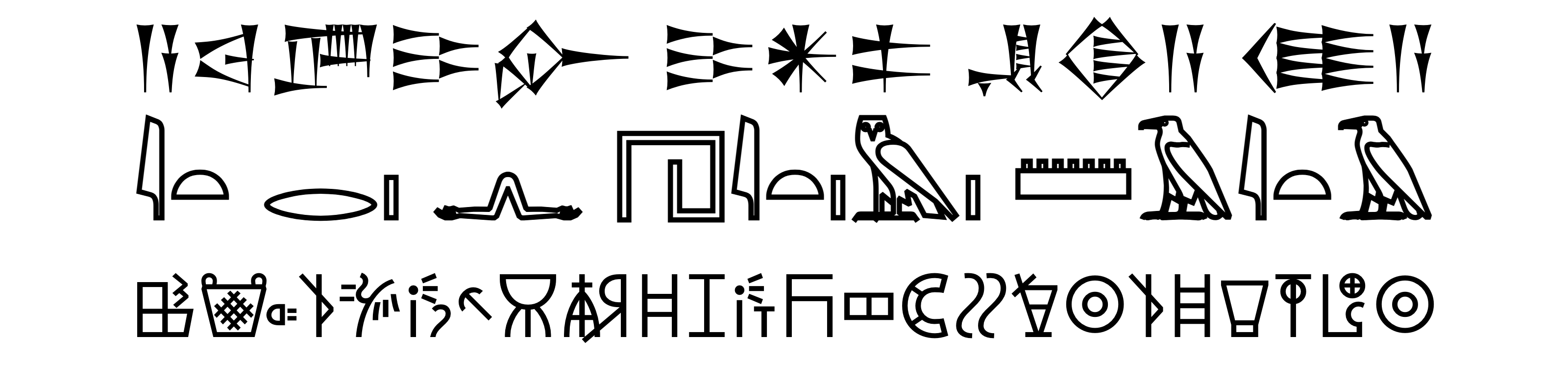
Unicode also plays a crucial role in safeguarding contemporary endangered scripts. In a sense, it is a standardized way of preserving our linguistic history. But did you know that Unicode is also preserving the history of retrocomputing graphics?
Before we explore how it does that, let's first go through the history of early computer graphics.
Early Computer Graphics
In the early days of computing, memory and speed constraints often made it impossible (or too slow) to manipulate a full-screen pixel buffer.
A pixel buffer (or framebuffer) is a section of memory that stores the color of every pixel on the screen. Updating an image means writing new pixel values to this buffer, which can be demanding on early hardware with limited resources.
So, how do you draw when you can't draw? Easy, you just fake it!
The following sections present various methods, ordered by (subjective) graphical complexity.
2×2 Block Graphics
Let's start simple.
How do you draw something on the screen when you can only display text? Many 1970s and 1980s computers answered this question by providing characters specifically for faking graphics (often called "semigraphics").
By the late 1970s, ASCII had been well-established for over a decade, but it only defined characters up to 7 bits. Manufacturers freely customized the upper half of their 8-bit character sets, often using the extra slots to add custom graphical characters. This led to a variety of approaches, each unique to different computer families.
The ZX80 (1980), for example, featured perfectly square text characters and included 7 characters representing blocks of 2×2 pixels. Combined with a space character and color inversion, it was possible to represent all 16 possible 2×2 grid combinations (plus some extra shading):

Let's meet our running example, a little cassette tape icon, here rendered using the ZX80 character set:

Rendering this 16×12 pixels icon using 2×2 blocks takes a total of 48 characters, spread across 6 lines of text.
Other computers using 2×2 block graphics included the Dragon 32/64 (1982, 1983), the Panasonic JR-200 (1983), the Amstrad CPC (1984), and the Commodore PET (1977)—more on this particular computer in a bit.
2×3 Block Graphics
While 2×2 blocks work well with square characters, reading normal text in such an aspect ratio is unnatural. Other computers preferred to use taller characters, making 2×2 blocks appear stretched. The solution? 2×3 pixel blocks.
This increased graphical resolution at the cost of using more character slots, giving us this set of all 64 possible 2×3 blocks:

Here is our cassette darling once again, this time rendered using 2×3 blocks:

The same 16×12 pixels icon using 2×3 blocks takes a total of 32 characters, spread across 4 lines of text, a 50% reduction in characters and lines.
This increased resolution is not a chronological evolution from the previously mentioned computers, just another contemporary approach.
Computers that supported 2×3 block graphics included the TRS-80 (1977) and the BBC Micro (1981).
This character set should look familiar to European readers. In fact, we used it on our TVs to check the news, weather forecast, train schedules, or channel programs. Yes, Teletext used this exact character set to draw its graphics!
The fact that the BBC Micro supported 2×3 block graphics was not a coincidence either: it used an actual Teletext microchip made for TVs to render its text.
Aside: PETSCII
Before we move on to the big cheese, let's hop back to the Commodore PET.
The Commodore PET offered more than just 2×2 blocks. It featured shading characters, box-drawing symbols, all sorts of lines, triangles and more—enabling incredibly detailed art despite being only text-based.
This unique and rich character set became known as PETSCII and was reused in later Commodore computers, including the Commodore 64.

The PETSCII art community continues to thrive, with online editors and regularly updated galleries. Check it out!
2×4 Block Graphics
So, how do we level up from there? You guessed it, with a 256 character set of 2×4 blocks:
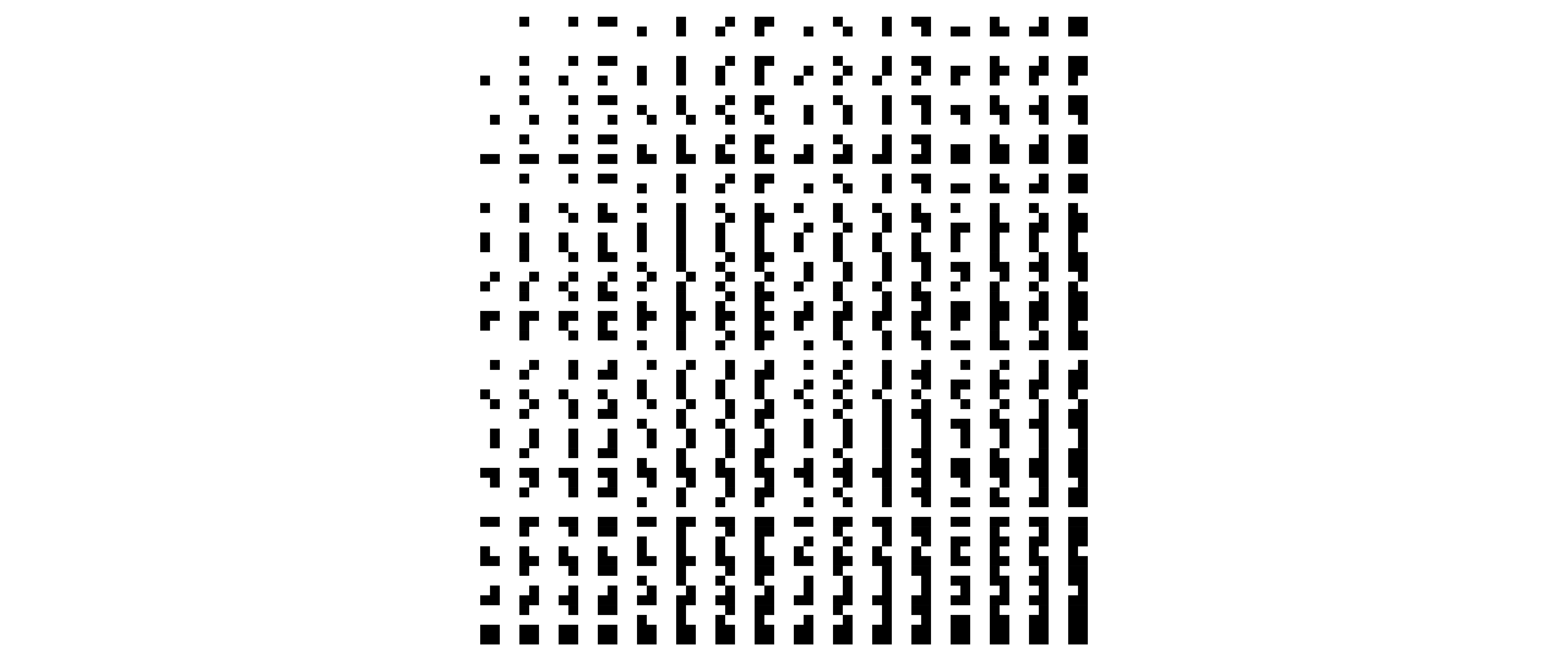
Very few computers supported 2×4 block graphics—after all, who wants to fill their entire character set exclusively with drawing characters? In fact, only one company, Kaypro, ever made computers that used them, in their Kaypro II, IV and 10 (1982-1983).
Although only half of the blocks were included (since the other half could be generated by inverting colors), that's still half of the set dedicated to graphics!
Here is our ever tinier tape, this time only using 3 lines of text, giving us much more resolution at the cost of character set space. Compared to using 2×2 blocks, that's four times the resolution, and we only need half the lines of text to display the same image:

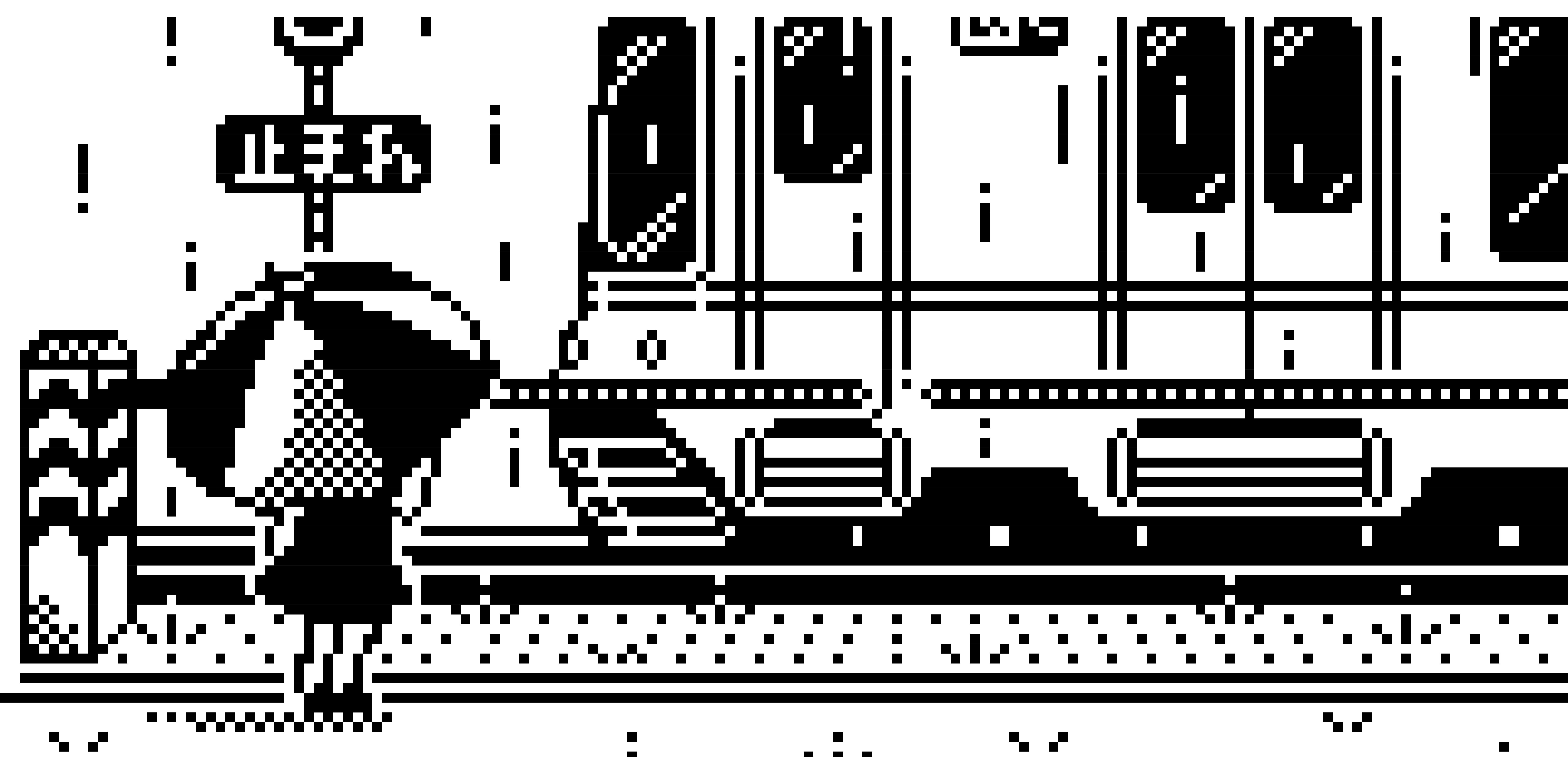
And here is what's possible to render on a standard 80-column screen:
Modern Day
And that's it for this short retrocomputing retrospective. So, how can we draw stuff in our terminals today?
You might not notice it in this printed medium, but all the illustrations so far were rendered using real text (dun dun dun!), and that's all thanks to Unicode.
Compiling all the 2×4 blocks into one table is surprisingly tricky. The order of this character set in Unicode is all shuffled around, and because Unicode avoids issuing duplicate characters, 2×4 blocks visually identical to previously introduced characters are omitted. This leaves a lot of gaps in the address space that need to be filled manually from other parts of Unicode.
On modern PCs, from Unicode's first version, and before that in various other encodings (for example, the famous Code Page 437 on DOS), it was possible to draw "pixels" in a terminal using the UPPER HALF BLOCK (▀) and LOWER HALF BLOCK (▄) characters.
With those, it was possible to draw very big pixels—twice as big as the very first 2×2 blocks examples above—but that's all we could draw for a long while.
Then, revision after revision, the Unicode Consortium blessed us with more and more characters:
Type | Year | Unicode block | Aspect ratio | Resolution ---------------------------------------:|:----:|-------------------------------------------------------------------------------------------------------------------------|:------------:|----------------------- 1×2 blocks | 1991 | Block Elements (Unicode 1.0) | 1:2 | 2 ppc Braille | 1999 | Braille Patterns | 1:2 | 8 ppc* 2×2 blocks | 2002 | Block Elements (Unicode 3.2) | 1:1 | 4 ppc 2×3 blocks, semigraphics | 2020 | Symbols for Legacy Computing | 2:3 | 6 ppc 2×4 blocks, semigraphics, sprites | 2024 | Symbols for Legacy Computing Supplement | 1:2 | 8 ppc
For a long time, the best resolution achievable in text was using braille, since all possible dot combinations were included—even if they were not actually used in any braille script.
However, they were highly impractical. The dots are too small, and the gaps between the lines are too wide, making it hard to visually parse:

But then suddenly, out of nowhere, came in 2024 the "Symbols for Legacy Computing Supplement" block, officially adding native 2×4 block characters.
It is kind of a miracle that these 2×4 blocks were accepted into Unicode at all. In the initial proposal in 2021 for adding more legacy computer graphic characters, the inclusion of the "block octant graphics" from the Kaypro computers was evaluated to be of only "medium" importance, ranking 5 out of 7 for priority.
Note: Since these latest block characters were just added last year, few fonts support them. The examples in this article used Iosevka, an open-source customizable font. Fairfax HD and Cascadia Code also support them.
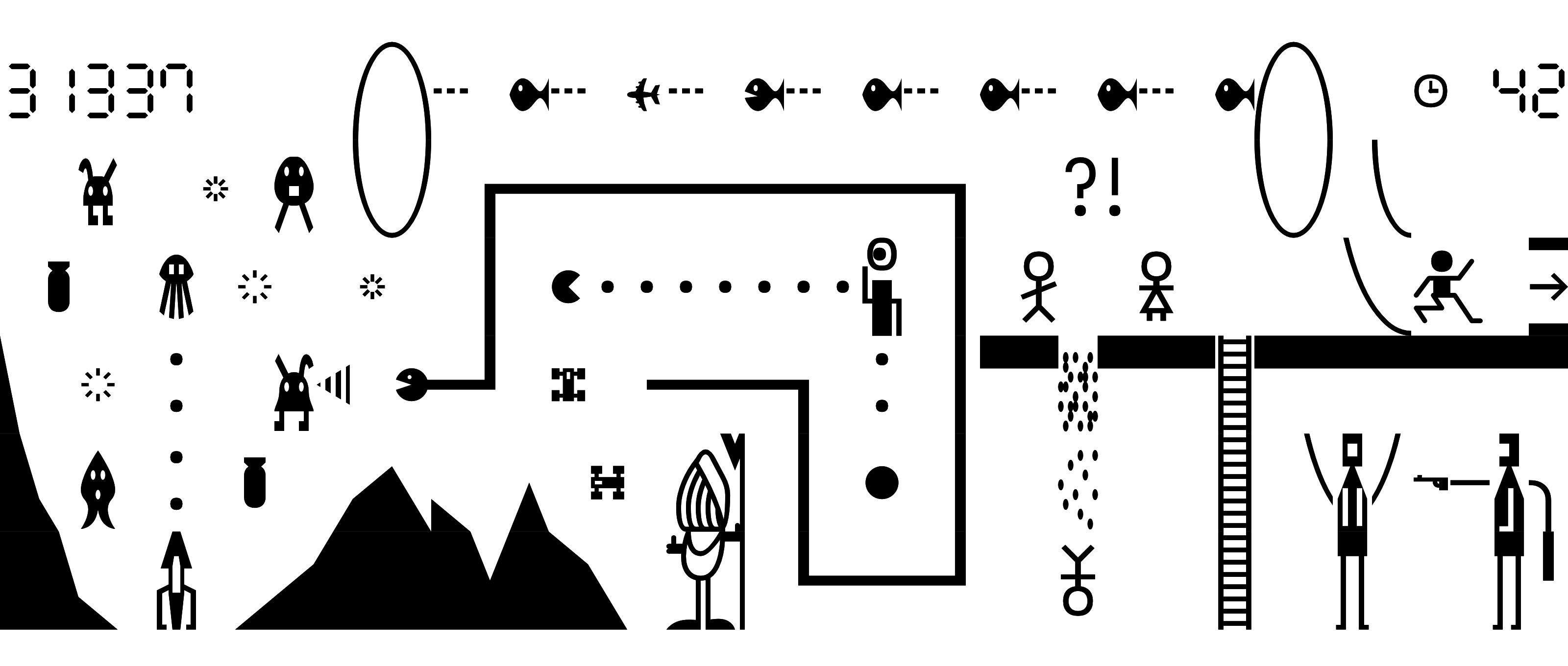
But thanks to that proposal, we can now have a lot of fun in our modern terminals. And not just with the block graphics: we also got sprites for Pac-Man, snake, aliens, and more!
Enjoy this handmade wimmelbild, and thanks for reading.
Bonus: Free Game Included!
Remember in the '80s, when some computer magazines would come bundled with a totally free game? The catch: you had to type out pages of highly compressed, heavily obfuscated and code-golfed BASIC source code (or even raw binary).
It's time to bring this tradition back.
String R =("20/$a8/$ab/#82/&00/*98/&01,&05/*9d/&05,"+"""
&09/*80/&09,&0d/#e6/&0d,&20/#e7/&20,&36/#85/$a3/&36,&45/
*96/&45,&49/*8c/&49,&4d/*9e/&4d,&51/*9b/&51,&71/$a0/&71,
&90/*97/&90,&94/*9a/&94,&98/*90/&98,&9c/*9c/&9c,&ac/*82/
&ac,&db/*84/&db,&df/*99/&df,&e3/*9f/&e3/*86/&e4,&e6/*88/
""").replace("$","1ce").replace("*","25")//blockify.java
.replace("&","1cd").replace("#","1fb").replace("\n","");

String s(String n, int i) {return "0x"+n.split(",")[i];}
int h(String n, int i) {return Integer.decode(s(n, i));}

void main(String[] in) throws Exception { var s = in[0];

var u=s.contains(":") ? new URI(s) : Path.of(s).toUri();
var p=javax.imageio.ImageIO.read(u.toURL()).getRaster();
var B = Stream.of(R.split("/")).flatMap(r  ->  IntStream
.range(h(r, 0), r.contains(",") ? h(r, 1) : h(r, 0) + 1)
.mapToObj(Character::toString)).toList();  //Tenchi 2025

for (int j = 0; j < p.getHeight(); j += 4) { var l = "";
for (int i = 0; i < p.getWidth();  i += 2) { int z =  0;
for (int n = 0; n < 8;++n) {try { //github.com/Tenchi2xh
if (p.getSample(i + n%2, j + n/2, 0) > 127) z |= 1 << n;
} finally {}} l += B.get(z); } System.out.println(l); }}
Type out the code in a file named blockify.java, then run it with: java --enable-preview blockify.java IMAGE_FILE_OR_URL (Requires Java 23, and a compatible font like Iosevka, Fairfax HD or Cascadia Code).
Try out for example: java --enable-preview blockify.java https://tenchi.team2xh.net/ttt/images/tram_station.png.
If you like this kind of thing, check out ttt (source), a fully fledged block character rendering tool made by yours truly.
Good luck!